 We recently caught up with Tom Wilsher, Head of Product Management, to revisit the journey behind Ticketer Driver Connect – our innovative, new feature that’s already creating value out on the road for customers such as First Bus.
In this article, Tom talks us through where the idea for Driver Connect came from, its powerful functionality, and how it improves day-to-day operations for both our customers and their drivers alike.
A Feature Defined by Feedback
Q. So, Tom, take us back to the start: how did the idea for Driver Connect first come about?
“As ever with our innovations, it was very much a ‘you asked, we listened’ development – built directly around the challenges customers told us they needed to be solved.
Many use radio technology which usually requires extra hardware, is costly to maintain, and not always as effective as operators would like due to shorter-range radio frequencies limiting communication reach.
Radio has been part of the industry for a long time but hasn’t kept up with the needs of modern services, and we were repeatedly hearing that operators needed clearer, more sophisticated communication over greater distances, without the ongoing cost and complexity that traditional systems bring.
Ticketer Driver Connect was created to deliver just that; offering a more integrated, sophisticated, and dependable alternative. Our aim was to make communication simple, familiar and accessible, leveraging the existing Ticketer solutions that our customers already deploy and trust.”

Three Powerful Components
Q. Talk us through Driver Connect’s functionality…
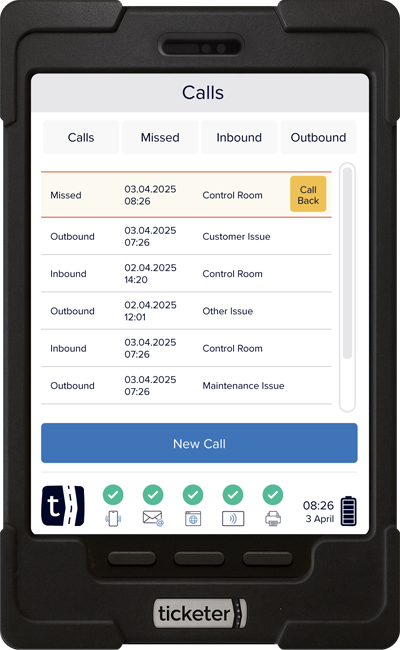
“Using the Ticketer TK300’s in-built mic and speakers, Driver Connect provides three powerful components in one place: two-way calls, voice messaging and text messages.
One of Driver Connect’s key strengths is its voice call component, where both control room teams and drivers can communicate with each other between the TK300 ETM and the back-office Portal solution, just as if they were making a phone call. Since Driver Connect runs on 2G signal and up, customers can communicate without risk of radio interference and across a far greater range than radio technology allows, which will be a game changer for operators whose services tend to travel far from the depot.
For calls going into the control room, we offer two levels of priority – standard and emergency – with the latter made either by pressing a button on the driver console or integrated with a physical in-cab button, be it pre-existing or installed during rollout.
Our second component, ‘Voice Messaging’, is Driver Connect’s advanced broadcasting functionality. Unlike traditional radio which issues messages to everyone at once, relevant or not, Driver Connect allows control room staff to record and send voice messages within the Ticketer Portal to specific drivers, services, vehicles or depots, making it a more targeted and precise method of broadcasting than our industry’s previously been used to.
What’s more, these messages can also include active and expiry dates, ensuring drivers receive important updates even if, for example, they start their shift later in the day or are on a break when the message is first issued. Broadcasts can be configured to autoplay as soon as they’re active meaning no driver interaction is required to hear the update, with playback also available so drivers can listen to the message when the vehicle’s not in motion should they need to – capabilities which just aren’t available currently on radio systems.
The final ‘Text Messaging’ component adds a further layer of communication as control rooms can send or schedule written messages with the same targeting precision as our voice broadcast component, and drivers can reply with free-text or pre-defined (“canned”) responses. Messages can also be colour-coded for urgency, with visual and audio alerts for priority communications – again helping ensure no important updates get missed.”
Different Users, Different Needs
Q. It sounds like Driver Connect has been designed with both drivers and control room teams in mind – was that a key focus during development?
 “Absolutely. From the outset, we wanted to consider both users, their different needs, and how we could help them communicate with one another more efficiently.
From the driver perspective, safety and simplicity were key. We knew features such as emergency and standard call levels would be important, but also that the speed and accuracy of responses to daily standard calls would always need to remain a priority.
That’s why we also offer the option for customers to add ‘call categories’ to their setup. When drivers ring the control room, they select a reason for their call from a predefined list before the call connects. Control room staff can immediately see why a driver is calling, for example due to an engineering issue, and triage it to the person best positioned to help for a speedy resolution.
On the control room side, we focused on making the feature as intuitive as possible within the Ticketer Portal so teams can respond quickly and manage communications effectively. Control room staff can make themselves available for calls or take themselves ‘offline’ if for example going on their break, and they also have a clear view of all inbound call activity, including call queues, how long each driver has been waiting, who is currently on a call, missed calls and call durations.
They can also initiate calls to specific drivers directly from various areas of the Ticketer Portal. For example, if they’re viewing a vehicle on the Tracking page and need to contact the driver about their route, they can start a call immediately from that screen rather than having to click through elsewhere and going through a slower process. Ultimately, the feature has been designed to combine simplicity with effectiveness on both sides of the conversation.”
Driving Value for Operators
Q. Moving on from the functionality side of things, what key operational challenges do you think Driver Connect will help solve?
“For operators who already have a communication system in place, Driver Connect enables enhanced and more cost-effective two-way communication with no installation complexity or downtime.
Not only does it offer more nuanced capabilities around responsiveness, targeting and timing precision, but because it leverages the TK300’s in-built mic and speakers, there’s no need to purchase additional hardware, pay installation fees or fund more costly radio licenses. It’s rolled out over-the-air and switched on within the Ticketer Portal, making it really straightforward to enable faster, clearer and more consistent dialogue with drivers at the moments it matters most.
For those who do not have anything in place yet, it’s all the above. Typically, customers won’t have radio technology due to cost or because, quite frankly, they’re busy and don’t have time to oversee hardware roll out. Driver Connect removes those barriers – offering a new and accessible alternative for them to enable direct communication between the control room and drivers for the first time.”
Improved Driver Engagement & Confidence
Q. From a driver standpoint, what key benefits of Driver Connect do you think they will enjoy while out on the road?
“From a driver’s perspective, one of the biggest benefits is receiving clearer, more timely communication that’s actually relevant to the service they’re running. When drivers receive blanket radio broadcasts that don’t apply to them, it can naturally lead to disengagement, and over time that reduces responsiveness when a genuinely important message comes through. With Driver Connect’s ability to set active and expiry dates, as well as tailor broadcasts to a specific service or even an individual driver, every update feels more purposeful and meaningful. When a notification arrives, they know it matters.
Then alongside this, it’s also got to be the emergency call function.
Emergency calls automatically override any other incoming calls to the control room and move straight to the top of the call queue, ensuring they’re prioritised and responded to as quickly as possible. This escalation logic helps operators react faster in high-pressure situations, giving drivers confidence that urgent issues will never be lost in routine communication.”
Optimised With Insights
Q. Will there be any reporting available on Driver Connect’s usage to further optimise communication?
“Reporting for Driver Connect sits within the Ticketer Insights Hub and focuses on the call component, giving operators a clear view of call activity so they can understand how that component is being used across their services.
From a responsiveness standpoint, operators can easily see whether their control room teams are responding to emergency calls quickly or missing them repeatedly. On a driver level, customers can clearly view which individuals consistently miss calls. This level of visibility supports ongoing monitoring across both control and driver teams, helping strengthen communication habits, improve accountability and ultimately drive greater operational efficiency. It’s another example of how Driver Connect closes the loop between communication, action and insight.
Reporting will continue to develop as more operators begin using Driver Connect and share what information they find most valuable. Reporting for text messages and broadcasts has not been introduced yet, and future enhancements will be shaped by real usage and customer feedback. For now, Insights provides a clear starting point, with more to come as the product evolves.”
Before we wrap-up, any final thoughts to share with us?
“I am really excited to see how Driver Connect continues to develop and create efficiencies for our customers, from whom we’re already receiving excellent feedback.
The goal is to give operators and drivers clearer, faster and more reliable ways to communicate, helping them react to what is happening out on the road in real time. If we can make people feel more supported and better connected, that is exactly what we want to achieve.”
If you’d like more information or a demo of Driver Connect, please email info@ticketer.co.uk.
 Other news and updates